

For parents and guardians
One account for every team that uses SeasonLane.
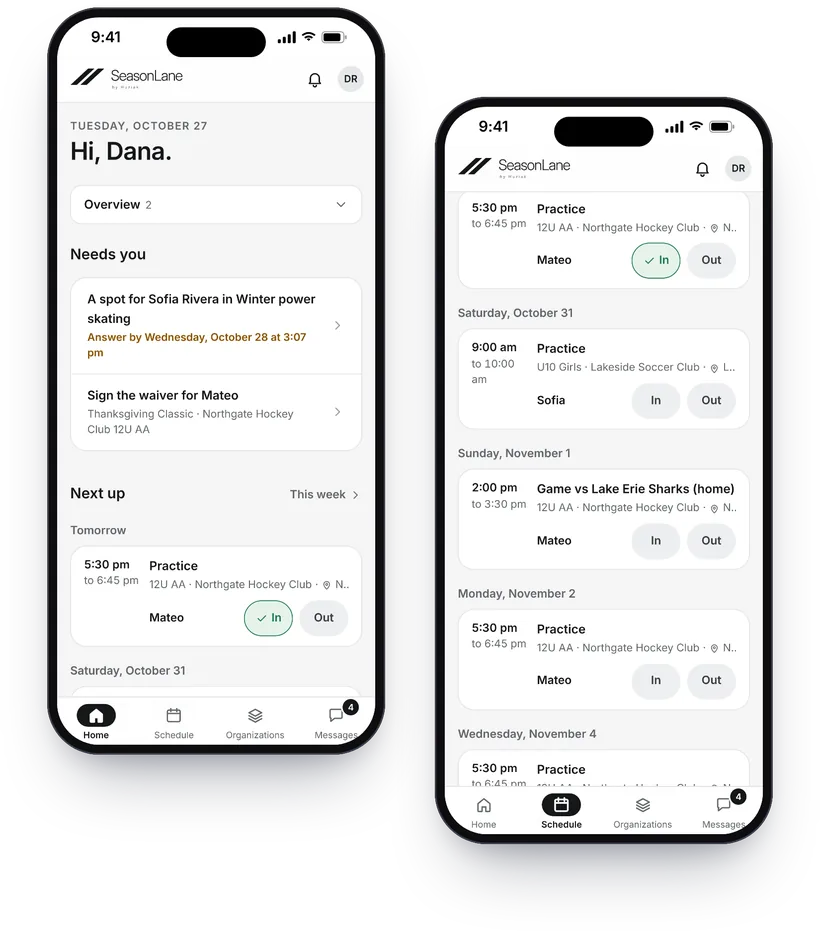
Keep the same family sign-in when another club, rink, camp or league uses SeasonLane. Register an athlete you already added, see practices and games in one schedule, answer In or Out, keep up with your teams’ chats and see what you’ve paid across organizations.
Stop starting over every time your child joins something new.
Your child has one athlete record in your family account. When another organization on SeasonLane invites the same athlete, you connect the invitation to the record you already have, instead of making another family login.
Mateo Rivera
- Northgate Hockey Club12U AA, #17
- Ridgeview Skills AcademyPower skating
- Lakeside Soccer ClubSpring league
One schedule
Practices, games and program sessions from every organization in one place, with calendar links for your phone, and a team’s public schedule to share with family and friends.
One answer
Choose In or Out for practices and games, from the schedule or the reminder your team sends before each one. The coach sees who’s coming.
One payment history
Payments, balances and due dates across your athletes and organizations.
One private athlete record
The Player Passport keeps teams, seasons, stats and recognitions together. You decide whether anything is shared.
Joining a team takes three steps.
-
1
Your organization invites you
The organization adds your athlete and sends a private invitation to your email address.
-
2
You connect the athlete
Sign in or create an account, then connect the invitation to the athlete you already added, or add the athlete once.
-
3
You choose who else has access
Invite another guardian with full access, or a family member who can only view.
Invitations are sent to a specific email address and expire after 14 days. Accepting an invitation
The things parents check all week, in one place.
Schedule and In or Out
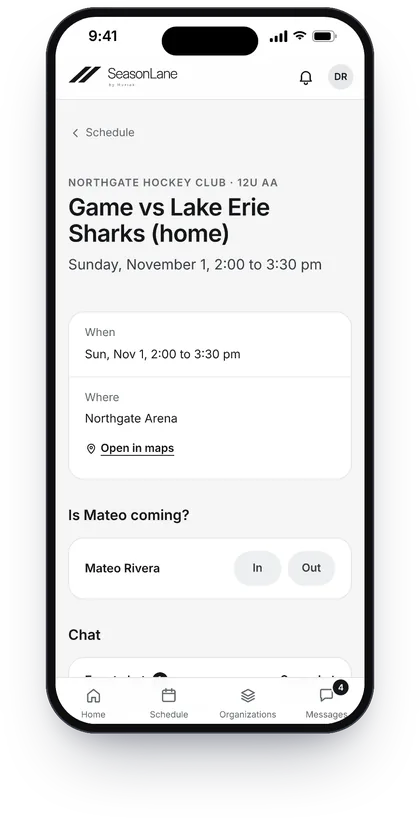
See the next practices, games and events, answer In or Out, get a reminder before each one if your team sends them, and add the schedule to your phone’s calendar. Grandparents and friends can follow a team’s public schedule without an account.
Team communication
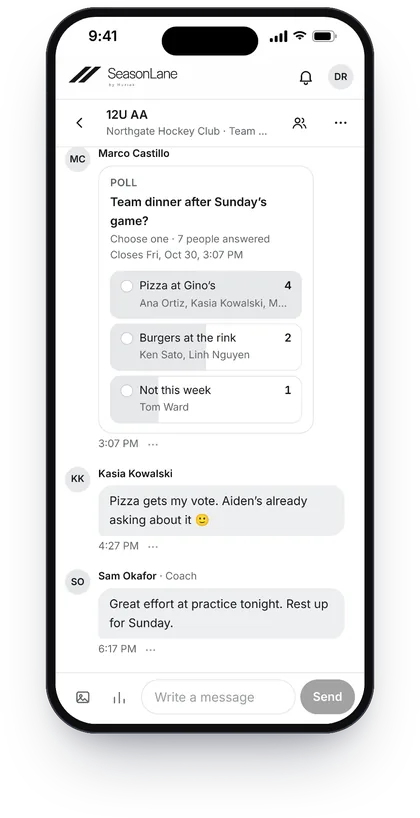
Team chats include the coaches and the team’s families. An event’s chat can include a sub for that game only. Organizations send announcements, and important ones ask you to say “Got it.”
Registration and payments
Register for programs from the athlete record you already have. See what you’ve paid, what’s still owed and when it’s due. Where the organization takes cards, pay by card on Stripe’s secure page.
Discover
Find public tryouts, camps, clinics, tournaments, leagues and teams looking for players. Tell an organization you’re interested, and share a Player Passport only if you choose.
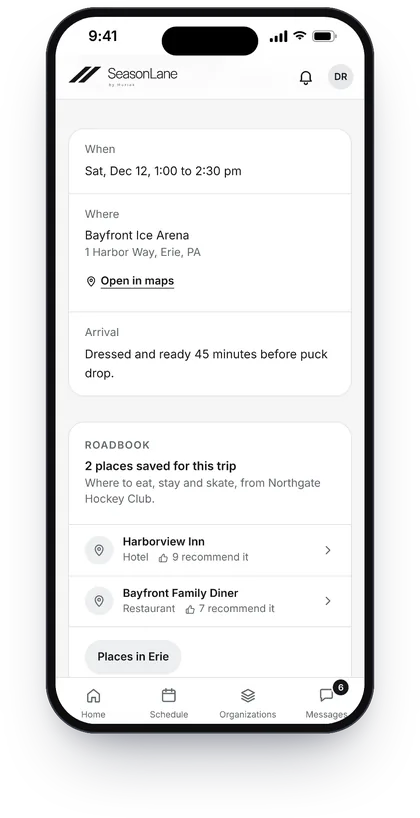
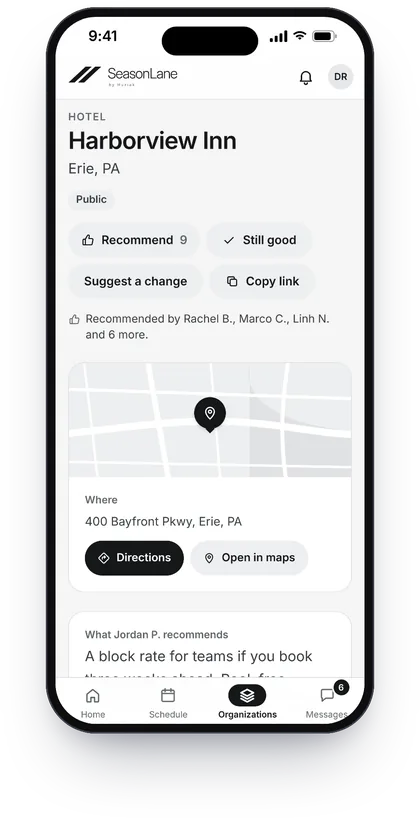
Away this weekend? See where the team eats and stays.
If your club or team uses the Roadbook, the places its families and staff recommend are a tap from the away game: the hotel, the place for a team breakfast, where to buy tape before the game.
- Get directions, read the tips and see who recommends a place.
- Been somewhere good? Add it, say it’s still good, or tap Recommend.
- It’s private to your club. Tips and notes never leave it.
Private by default.
A child’s athlete record isn’t a public profile. Each organization sees only what it needs for its own teams and registrations, and never the athlete’s other organizations.
Organizations see their own part.
An organization sees your child’s name, birth month and year, and how to reach you, for its own teams and registrations. If it corrects your child’s name or birth date, you get an email saying what changed.
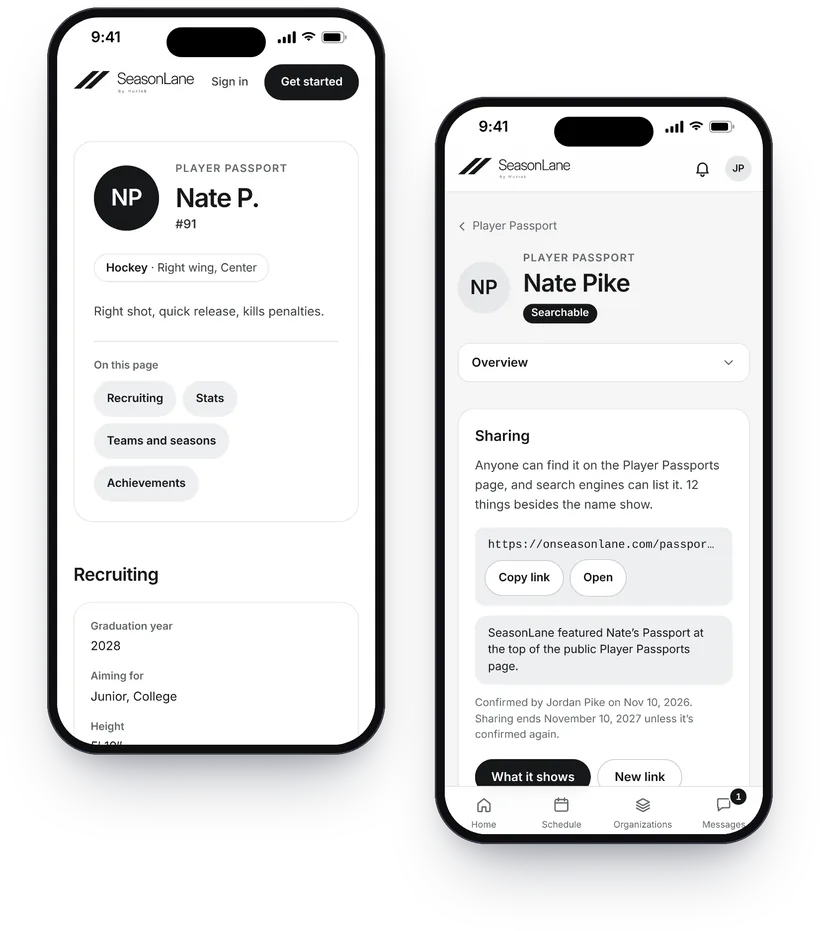
Passports stay private unless you share them.
A guardian with full access chooses whether to share a Passport, and exactly what appears. Only athletes 13 and older can have a searchable Passport.
Players don’t have accounts.
Parents and guardians sign in. Your child has an athlete record, not an account.
No ads.
SeasonLane doesn’t place ads in the family experience, on any plan.
Every season can follow the athlete.
The Player Passport brings together teams and seasons from organizations on SeasonLane, plus stats, recognitions from coaches, photos, highlight links and the history you add. Club rosters verify teams, and verified game sheets add stats. It stays private until a guardian chooses to share it.
From 13, add recruiting details to showcase their experience, and let coaches write to you through SeasonLane. Messages never go to your child, and coaches get your email only if you reply.
Put SeasonLane on your Home Screen.
SeasonLane works as an installable web app. Add it to your phone’s Home Screen from your browser and open it like an app, without an App Store or Google Play download.
Why
Your schedule, In or Out and team chats are one tap away, full screen, with SeasonLane’s own icon. Turn on notifications for schedule changes and messages, with quiet hours.
How
On an iPhone, open SeasonLane in Safari, tap Share, then Add to Home Screen. On Android, open it in Chrome, tap ⋮, then Install app.
When you accept an invitation
Accept first. If the link opens inside your email or another app, open it in Safari or Chrome. On an iPhone, sign in once more in the Home Screen app: it keeps its own sign-in.
Questions families ask.
Do I need a different account for each club?
No. Use the same SeasonLane sign-in when another organization on SeasonLane invites you, and register for its programs from it.
Does my child need a separate login?
No. Parents and guardians sign in. Your child has an athlete record, not an account.
Can other clubs see where my child plays?
No. Each organization sees its own teams and player information, never your child’s other organizations.
What is the Player Passport?
Your athlete’s teams and seasons from every organization on SeasonLane, verified by each club, with season stats, recognitions from coaches, photos, highlight video links, and the seasons and achievements you add. It’s private. A guardian with full access can share it by link, or as a searchable page for athletes 13 and older that’s also listed on SeasonLane’s Player Passports page, showing only what they tick, and can make it private again at any time.
Can I see what I’ve paid?
Yes. Payments shows every payment for your athletes across organizations, by card or recorded by the organization, and what’s still to pay with its due date, jersey orders included. Organizations can email you a reminder, and only ever ask for what’s still owed.
Can I register for programs and see schedules?
Yes. When an organization publishes a camp, clinic, tryout or season registration, you register from its page using your athlete’s existing record. Your teams’ practices, games and program sessions show in one schedule across organizations, where you answer In or Out and add it all to your phone’s calendar. Teams can send a reminder before each event, and you can turn those emails off in your notification settings.
Is there an app?
Yes, without an app store: add SeasonLane to your phone’s Home Screen from your browser (in Safari on an iPhone, Share, then Add to Home Screen; in Chrome on Android, Install app). It opens full screen with its own icon, and can tell you about schedule changes and messages. The steps for your phone are at https://onseasonlane.com/install.
Can I message my child’s coach?
Yes. In your team’s chat, with the coaches and the other families on the team, and in each event’s chat. Where the organization allows it, you can also start a chat with the coach alone, or with a few parents (a carpool, say). Chats take photos, links and polls, you get one email per chat when something waits unread, and you can mute a chat.
More answers in the FAQ and the help center for families, or ask about your account or privacy.