Skip to content
SeasonLane by Huziak SeasonLane by Huziak

For clubs, rinks, leagues, trainers, teams and tournament hosts

Run your sports organization without stitching together separate tools.

SeasonLane connects the work your organization already does: registration, payments, player records, rosters, one calendar for every team and the ice they share, In or Out, team communication, officials, game sheets, tournaments, leagues, rentals, jersey orders, fundraiser links and public opportunities. The same family account follows parents across every organization on SeasonLane.

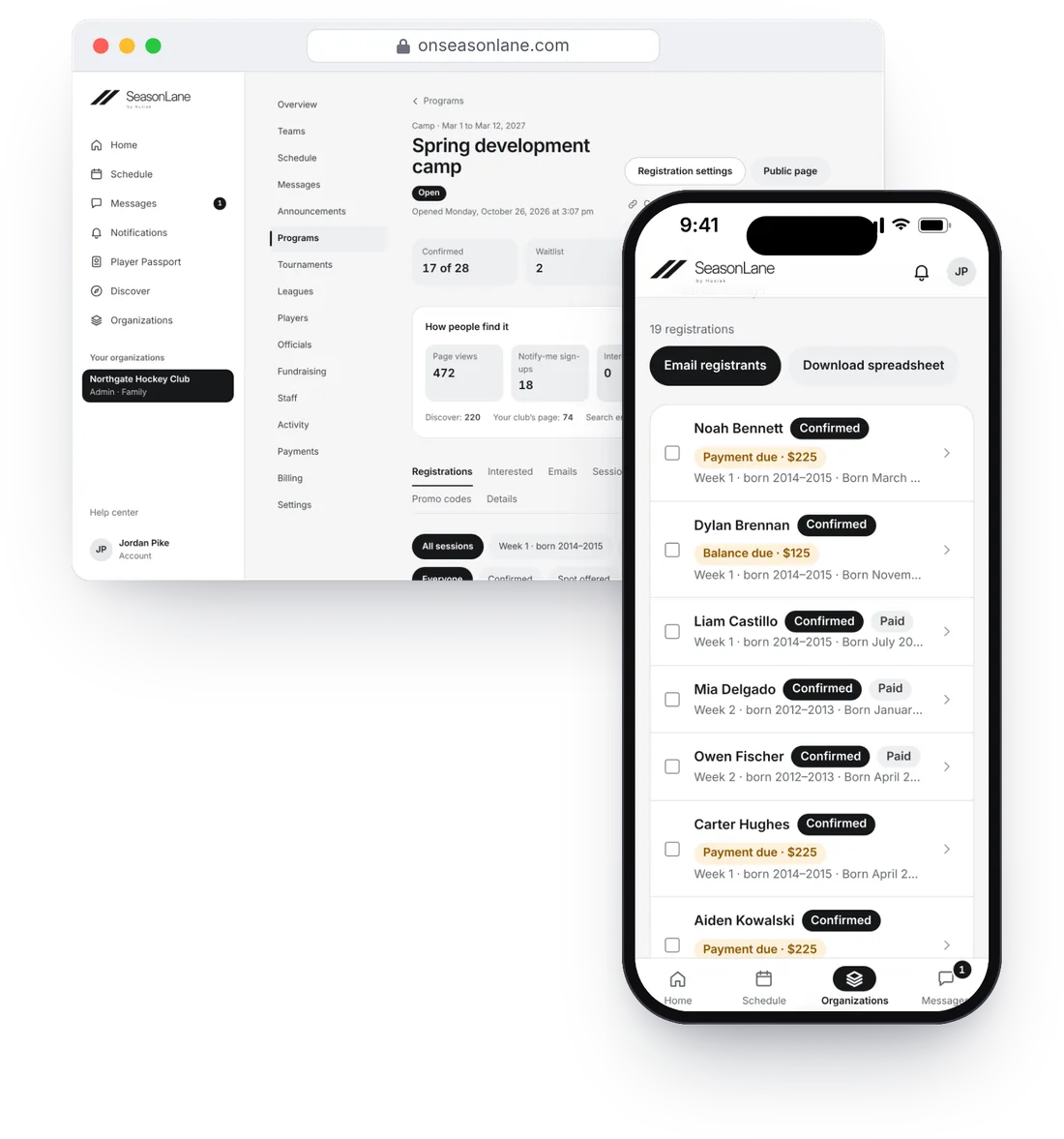
A spring camp in SeasonLane, as the club sees it. On the laptop: 17 of 28 spots confirmed, 2 on the waitlist, and how families found the camp. On the admin’s phone: the registrations, each with what’s paid or still due.
A camp on the club’s laptop and the admin’s phone. Names are made up.

The value isn’t another feature. It’s what happens between them.

  1. 1

    Registration becomes the roster

    Families register an athlete they already have in their account. Once confirmed, the athlete joins the session’s team roster, without rebuilding the record somewhere else.

  2. 2

    The roster becomes the team

    Coaches, managers and families get access from the team and their role. Schedules, In or Out, attendance, chats and announcements all use that same roster.

  3. 3

    The teams share one calendar

    Every team’s practices and games sit on one calendar with your sheets and rentals, so clashes show before anyone drives to the rink. Families get a reminder before each event, and anyone can follow a team’s public schedule.

  4. 4

    The schedule becomes game day

    Invite a sub for one game, ask officials and scorekeepers to work it, keep the game sheet and update the result, all from the same game.

  5. 5

    Results become records

    Verified game sheets set tournament and league results, and add each athlete’s stats to their Player Passport.

  6. 6

    This season becomes the next one

    Start next season from your current teams and coaches, choose returning players, tell families their team and archive the old season.

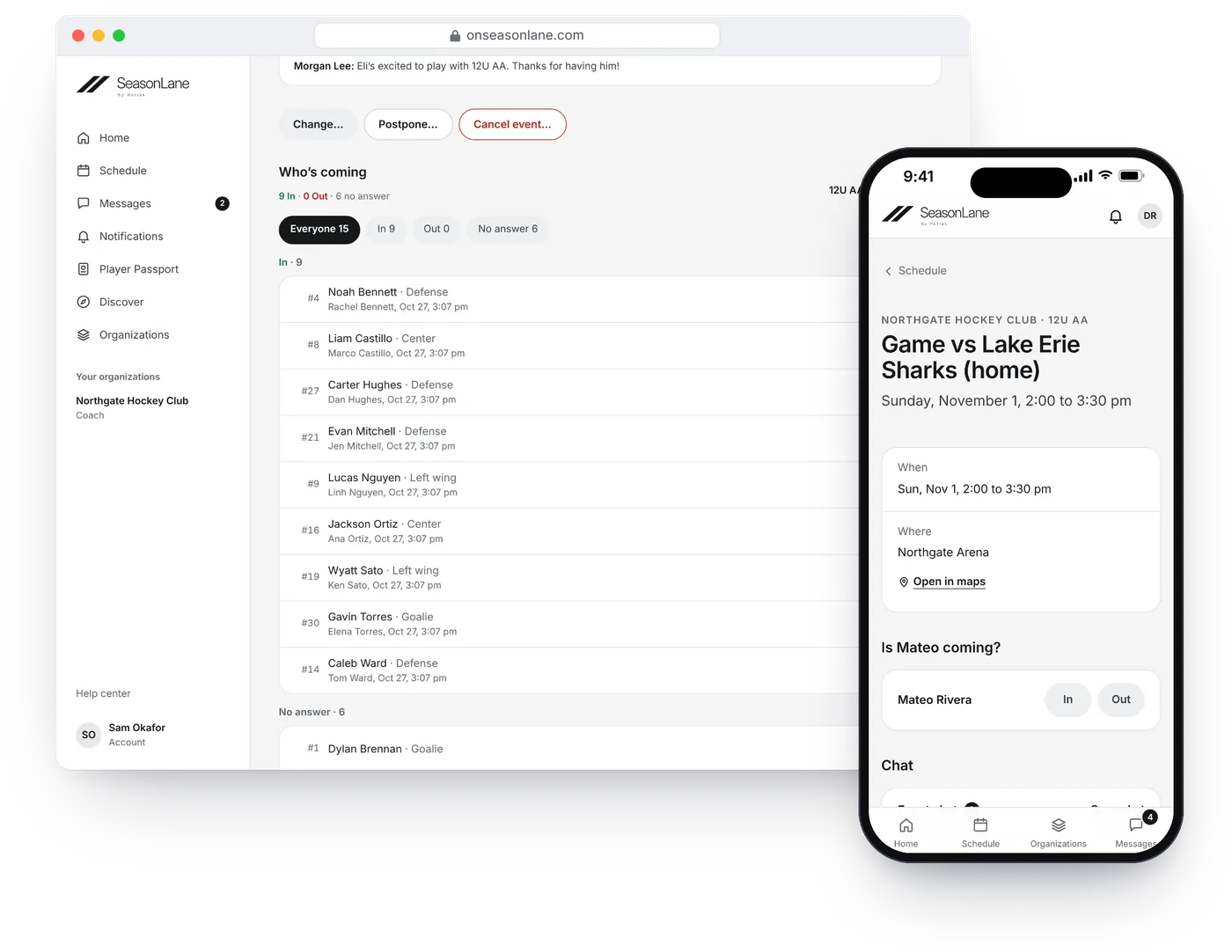
A coach’s view of Sunday’s game in SeasonLane, listing who’s coming, beside a parent’s phone asking whether their child is coming, with In and Out.
Sunday’s game: the coach sees who’s coming, and a parent answers In or Out. Names are made up.

Roadbook

Your families already know the good places. Keep them in one Roadbook.

The hotel that gives a team rate, the restaurant that seats the whole team, the rink where the stands are cold. On the Team and Organization plans, everyone in your organization adds places, tips and private notes, recommends what’s good and saves places for an away game or a tournament.

Saved for each trip

Places saved for an away game or a tournament show on its page for everyone who can see it, a tap from directions.

Moderated by your staff

Families suggest changes and report problems. Coaches, managers and admins act on them and hide what’s wrong. Owners and admins choose who adds places.

Public only if you choose

It stays private to your club. A place made public shares the place and what you recommend, never private notes, tips or who added it.

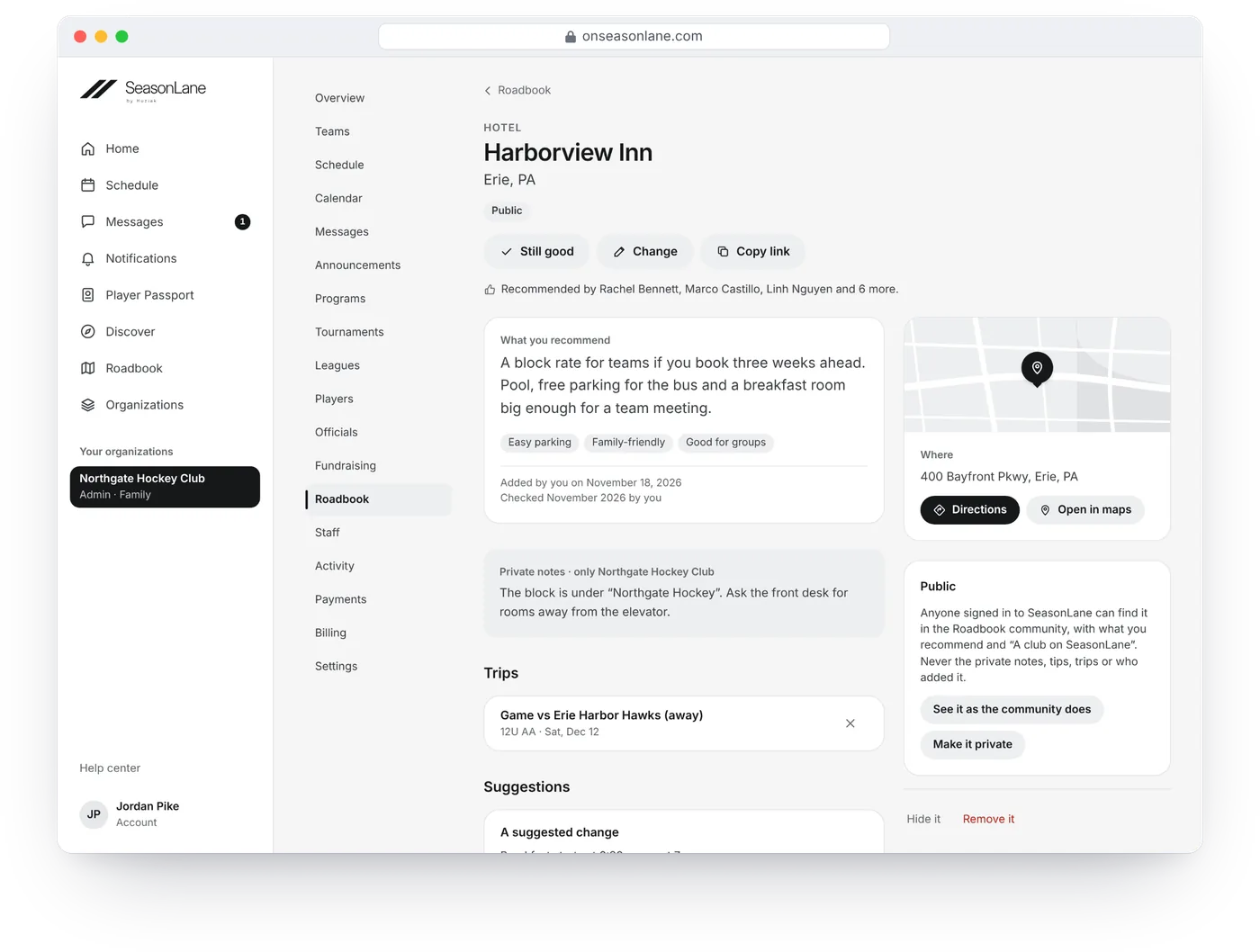
One hotel in a club’s Roadbook, as its staff see it: what the person who added it recommends, the club’s private notes, the away game it’s saved for, a suggested change to act on, and beside them where it is, with Directions, and whether it’s public.
One hotel in a club’s Roadbook, as its staff see it. Clubs, places and people are made up.

Moderate your Roadbook

Everything your staff needs, grouped around the work they do.

Registration and money

  • Camps, clinics, tryouts, season registration and team dues
  • Spots, waitlists and spot offers with deadlines
  • Waivers, deposits, balances and payment plans
  • Sibling discounts, and promo codes on the paid plans
  • Payments you take by hand, with a receipt for the family
  • Card payments straight to your own Stripe account, with refunds. On Free, SeasonLane’s fee is 0.75% of each registration payment (none on jersey orders or rentals); paid plans have none.

Help: Create a program

Teams and seasons

  • Seasons, teams and rosters, and staff roles by team or program
  • Players added one at a time, or pasted from a list or CSV on the paid plans
  • Subs for a single game, without joining the roster
  • Jersey orders with sizes, numbers and names, and a spreadsheet for your supplier
  • Start next season from this one

Help: Seasons and teams

Schedules

  • One calendar for every team by day, week or month, with clashes flagged and drafts you publish when ready
  • Practices, games and repeating events, with In or Out and attendance
  • A reminder before each event, and an earlier In/Out nudge on the paid plans for families who haven’t answered
  • A calendar link for each team, for phones and for family members without an account
  • A public page for each team’s schedule and for each game and practice, never players, unless you turn it off

Help: Schedule practices and games

Rinks, ice and rentals

  • On the Organization plans
  • Sheets at the rinks and fields you run, with public skate, closures and a lobby screen
  • The season’s ice given to teams against their sessions a week and curfews, with a fairness board, and teams taking, giving back and swapping ice
  • Many events moved or cancelled at once, weeks copied, one import for every team and a league’s calendar link read every night
  • Rental requests from outside groups, priced and approved, with caps per group and each place’s rules
  • Renters pay by card to your own Stripe account, or you record what they pay by hand

Help: Sheets and bookings

Communication

  • Team, coach, event and staff chats
  • Chats with one person or a few, if your organization allows them
  • Photos, links, polls, replies and reactions, with reporting to your moderators
  • Announcements to everyone, some teams or your staff, with who opened each one
  • Program emails with who they were delivered to and whose bounced
  • Notifications on families’ and coaches’ phones, with quiet hours

Help: Send an announcement

Game day

  • Officials, scorekeepers and EMTs who accept or decline each game
  • Each team’s crew and fees, with conflicts flagged
  • Game sheets: goal by goal in hockey, a box score in basketball, soccer, baseball, softball and football
  • Verified scores and each player’s stats

Help: Game sheets

Tournaments and leagues

  • On Organization Growth and Scale
  • Team entries and fees; visiting teams need no club on SeasonLane
  • Private rosters, and waivers each player’s own parent or guardian signs
  • Pools, brackets, schedules, scores and standings on a public tournament or league page
  • Anyone can follow a team
  • A league’s season made for you, and playoffs seeded from the standings
  • Games placed into your open ice, with how even the schedule is
  • Teams ask to change a game; the other team agrees, you approve

Help: Host a tournament

Growth and participation

  • Your own public page, with your logo and colors
  • Your public programs, tournaments and leagues on Discover
  • Teams looking for players
  • Families who say “I’m interested”
  • Player Passports that families choose to share with you
  • Fundraisers you run on RaffleRabbit or another site SeasonLane reviews

Help: Your public page

Running a fundraiser this season? See how RaffleRabbit can help your club share a prize-based campaign.

Move the next season, not your entire history.

Switching systems feels hard when your current season is already moving. Start with the next team, program or season, and bring your organization over in practical steps.

  1. Create the organization and season

    Set the sport and time zone, add your teams, and invite staff to the roles they need.

  2. Bring the roster you already have

    Add athletes one at a time, or paste a player list on the paid plans. Possible duplicates are shown before anyone is added.

  3. Invite families

    Each family gets a private invitation and connects the player to the SeasonLane account they already have, or creates one.

  4. Open the next program or season

    Publish registration, collect waivers and payments, build the schedule, and let the connected workflow take it from there.

Plan your switch

Pasted from your registration spreadsheet (example)

First,Last,Birth date,Parent email
Ava,Cho,2015-03-02,kim.cho@example.com
Mateo,Rivera,2014-05-12,
Noah,Park,2014-11-30,lee.park@example.com

12U AA

3 ready to add

  • Ava ChoNew, invitation ready
  • Mateo RiveraAlready in your club
  • Noah ParkNew, invitation ready
Paste a list. Review your players. Build the roster. Names are made up.

Your club gets its records. Families keep one account.

A family may have children at several organizations. They use one SeasonLane sign-in. Your staff sees only the players, teams and registrations your organization is allowed to manage, never the family’s activity elsewhere.

Common questions from clubs.

What is SeasonLane?

SeasonLane is sports management software for clubs, rinks, leagues, trainers, independent teams and tournament hosts, including youth sports and adult leagues. Registration, payments, rosters, schedules, team communication, tournaments, leagues, game day and family accounts use the same organization, team, athlete and family records, instead of living in separate tools.

Can I move players from a spreadsheet?

Yes, on the Team and Organization plans. Paste player rows from your spreadsheet, or pick a CSV file saved from it, with each parent’s name and email, then review a preview before anyone is added. Rows with a problem are shown, not guessed. On Free, add players one at a time.

Can SeasonLane handle registration and payments?

Yes. Publish a camp, clinic, tryout or season registration with spots, a waitlist, waivers and an optional deposit or payment plan, and families register online. Families pay by card, straight to your organization’s own Stripe account, and pay any balance by its due date. You can also record money you take by hand.

Can coaches see every player in my organization?

No. Coach access is limited to the teams they’re assigned to.

Can I run adult teams and beer leagues?

Yes. Invite adult players at their own email, or let them register themselves: anyone 18 or older manages their own record, pays and signs their own waivers. Divisions such as 30 and older are set by birth year.

I run one team. Is SeasonLane too much?

No. Set it up as a team and its menu is just that team: the roster, schedule, stats and messages, with payments and billing. Add yourself as a player if you play, and invitations go out as you add your teammates. Turn on club features later if you take on more teams.

Can SeasonLane run a rink’s schedule?

Yes. Every plan puts all your teams on one calendar, with clashes flagged, drafts, reminders and a public schedule for each team. The Organization plans add the sheets at the rinks you run, public skate and closures, giving the season’s ice to teams fairly, changes and imports across every team, and rental requests from outside groups, paid by card or recorded by hand.

Can SeasonLane run tournaments and leagues?

Yes, on Organization Growth (up to 4 tournaments and 2 leagues a year) and Scale (up to 12 and 6). Hosts take team entries, check private rosters and parent-signed waivers, build schedules, ask officials to work the games, enter results and publish standings and brackets on a public page.

Is SeasonLane only for hockey?

No. Teams, rosters, registration and schedules work for any sport. Game sheets are built for hockey, basketball, soccer, baseball, softball and football. Hockey is the first focus.

More: FAQ · Plans and pricing · Guides for clubs · Ask about moving your club

Bring your next season onto one connected platform.

Start with the teams and players you already have. Add the next program, schedule or season when you’re ready.